

Which Deals Are Going to Close This Month?
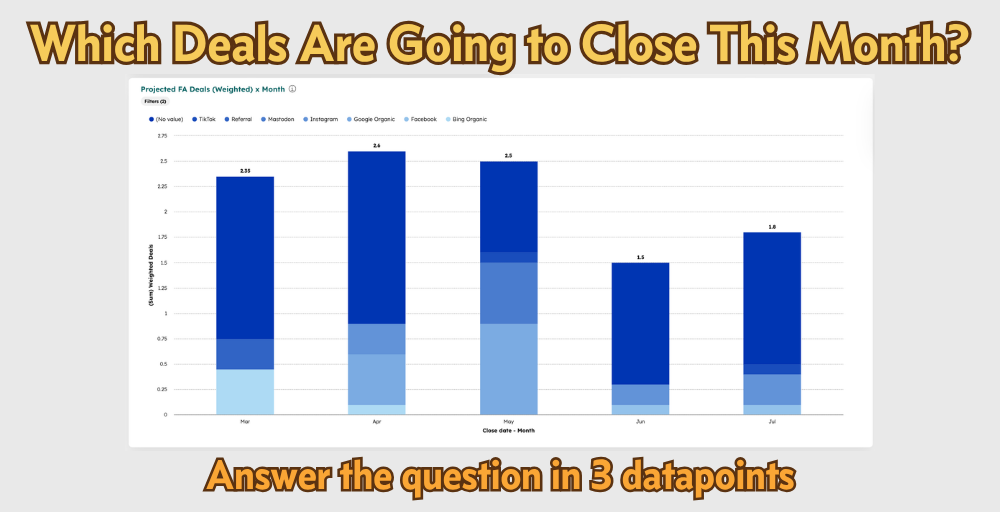
You asked or been asked this. On a Saturday morning, in a weekly pipeline review, or for a board update. HubSpot can answer this reliably so you don't have to.

In This Lab Report
HubSpot has all the tools you need to create projections and reporting on the Deal in your Franchise Sales pipeline that are expected to close. The setup and tools are simple and easy to use. You just need to process and diligence to use them well.
Why This Matters
The whole point of lead reporting, pipeline reviews, even CRMs comes back to the answering the question: what’s going to close? If you can’t answer that confidently from your CRM data, what are you even doing?

Close Date, Deal Probability, and FDD Cooling Off Ends give you the foundation for weighted pipeline Reports to answer that question using data. Add Units/Territories and FA Revenue and you have real, data-backed understanding of whats in your pipeline.
The Three Data Points
Close Date
This is an obvious one. Close Date is a built in property. While a Deal is open, its the expected close date. When its closed, is the actual close date.
This is the property that tells you the when. If the Deal could close this month, the Close Date should reflect that.
To manage Close Date you need:
To set a default Close Date based on your actual sales cycle for Closed Won Deals.
Reps to maintain it
For it to reflect the reality of the FDD Cooling Off period. (see more below).
Setting a Default Close Date
Set a default number based on your data. Not what you think your sales cycle should be. Review the at least twice a year. You can set a default in Deal settings or for more control you can calculate it and set it when a Deal is created with a workflow.
Maintaining Close Date
Closed Dates in the past on open deals are bad data which gives you bad reporting and leads to bad decisions. Close Dates should be maintained throughout the sales process as the decision evolves. When are they coming to Discovery Day? When does the Cooling Off period end? When is the candidate going on vacation? As reps check in on the process the should update the Close Date.
Conditional Properties can prompt reps to check and update the date whenever the Deal Stage changes and Deal Tags that flag lapsed Close Dates for review bring reporting visibility to the pipeline.
Deal Probability
No Deal is 100% likely to close, not matter how excited the Candidate is. That’s what Deal Probability is for.
You can set default probabilities on your Pipeline Stages. A Deal at the Application stage is statistically less likely to close than one at Discovery Day. That automatic assignment gives you a baseline without asking reps to set it manually on every Deal.
Review your stage-based Probabilities twice a year — same cadence as your Close Date defaults. What percent of Deals that reached that stage went on to win? There’s your default.
You get pretty good data is Reps do nothing.
They can also override the value based on their judgement, patterns, rules, etc. If a Candidate is more likely to close, they can adjust the number. Of course you will want to check in on this over time, but you’re probably asking Reps this question in your pipeline reviews anyway. Let the dat answer the question.
FDD Cooling Off Ends
Here’s were you need a custom property. The FDD Cooling Off period governs when you can close a Deal. So create a property in HubSpot to automatically calculates 15 days from FDD signing.
Then if your Close Date is before your FDD Cooling Off Ends for the Deal, you can automatically push the Close Date out with an automation. It’s a little more configuration but the accurate reporting you get out of it worth the minor effort.
Build some Reports
You’ll want:
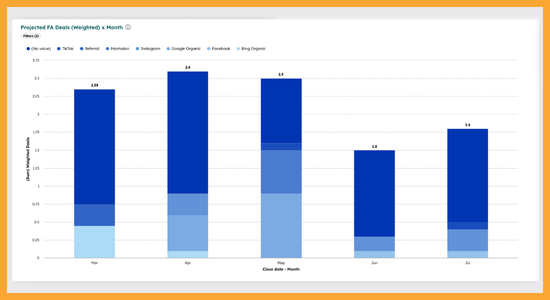
a report that is weighted Deals (Probability x Deals)
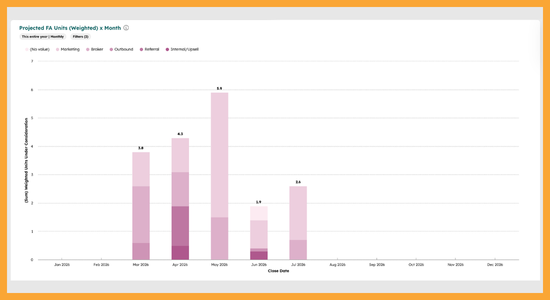
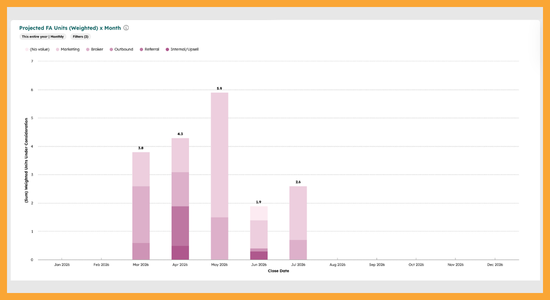
a report on Units, Probability x Units/Territories they’re considering stored on the Deal
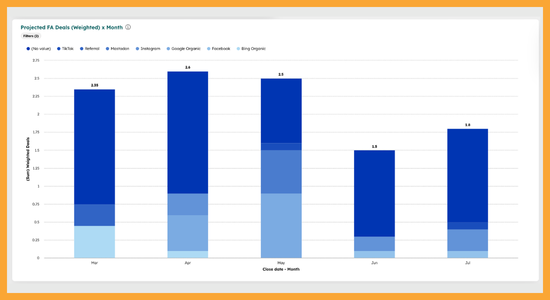
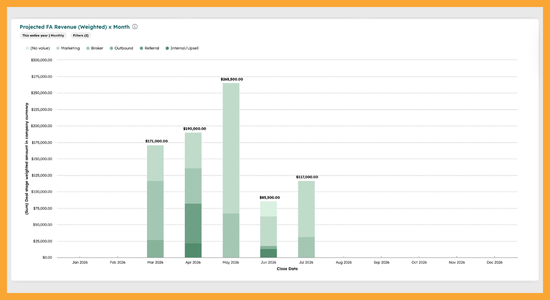
a report on Revenue, Probability x Deal Amount.
So…now what?
You know what to do:
Set a good default Close Date.
Make sure it’s being maintained (use a tag on Deals with Lapsed Close Date, have reps update as the Deal advances)
Set good default pipeline Probabilities.
Allows reps to set it on a per-Deal basis as warranted.
Use FDD Cooling Off Ends to make sure your Close Dates aren’t in the wrong window.
Build the reports.
Reply if you need help, happy closing!